
What AI Max Changes for a SaaS Account

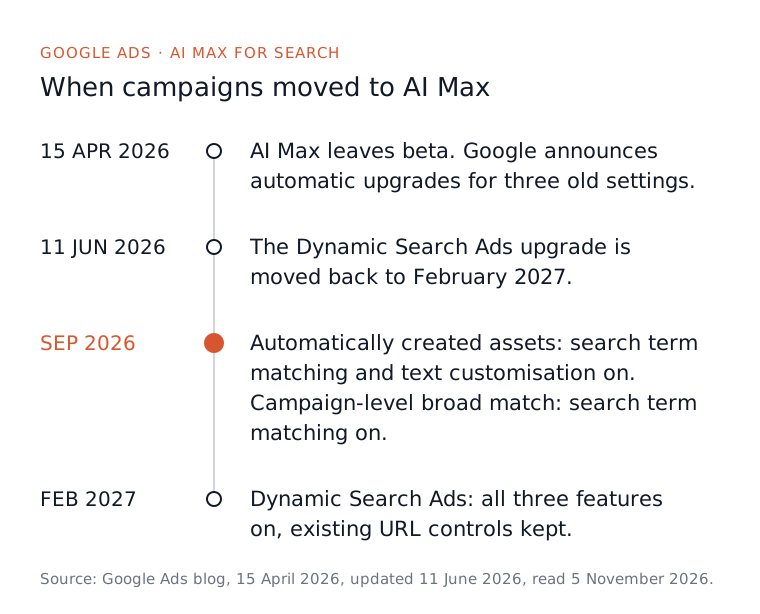
If your Search campaigns used automatically created assets or the campaign-level broad match setting, Google has already switched them to AI Max. The automatic upgrade started in September 2026, and Google said it expected it to finish by the end of that month. So “doing nothing” no longer means nothing changed: it means search term matching is probably on in your account right now. Dynamic Search Ads campaigns follow from February 2027.
For a B2B SaaS account with a few dozen conversions a month and a long sales cycle, our advice is not to switch the whole suite on everywhere because a Google rep asked nicely. Find out which campaigns were upgraded, read the searches AI Max added, fence off the pages you never want ads sent to, and test it on one campaign before you trust it with the rest.
What AI Max actually is
AI Max is not a new campaign type. Google’s set-up page, read 5 November 2026, calls it an optimisation layer inside an ordinary Search campaign, switched on and off from the campaign settings. It bundles three features that used to live in separate places, and it is worth knowing which is which, because each one does something different to a SaaS account.
Google’s page on how AI Max works, read the same day, describes them like this:
- Search term matching widens who sees your ads using broad match plus what Google calls asset-based and landing page-based technology. In plain terms, it can match a search to your ad because of what is on your website, not only because of the words in your keyword list.
- Text customisation (Google spells it “customization” in the interface, and it used to be called automatically created assets) writes extra headlines and descriptions from your existing ads, your landing pages and your website.
- Final URL expansion sends the click to whichever page on your domain Google predicts will perform best, rather than the landing page you chose.
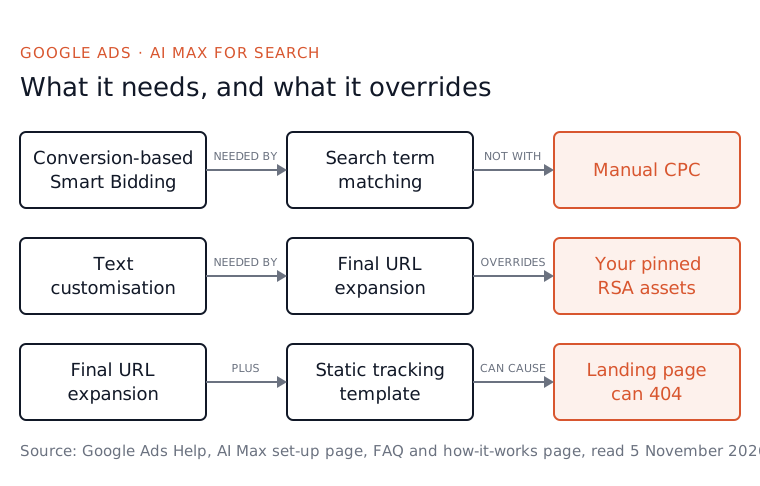
Search term matching comes on with AI Max for the whole campaign and can then be turned off ad group by ad group. The other two are campaign settings, and final URL expansion only works when text customisation is on, so the copy matches the page.
What happened to your account if you did nothing
Most SaaS accounts that never touched AI Max have still been changed by it. Google’s announcement on its Ads blog, dated 15 April 2026, updated 11 June 2026 and read 5 November 2026, took AI Max out of beta and set out three automatic upgrades. Which one reached you depends on which old setting a campaign was using.
- Campaigns using automatically created assets were upgraded from September 2026 with search term matching and text customisation both on by default.
- Campaigns using the campaign-level broad match setting were upgraded from September 2026 with search term matching on by default.
- Campaigns running Dynamic Search Ads were originally due in September too. The 11 June update moved them to February 2027, when all three features will be switched on with your existing URL controls kept.
The same post says new Dynamic Search Ads campaigns can no longer be created once the automatic upgrades begin. If your account was built years ago by an agency that liked broad match and automatic assets, assume at least one campaign was upgraded, and check rather than guess.

Why a B2B SaaS account should be careful with it
AI Max is built to find more conversions, and a SaaS account’s problem is rarely too few form fills. It is form fills from people who will never buy. Google’s own headline figure, from the same announcement (read 5 November 2026), is that campaigns using the full suite see an average of 7% more conversions or conversion value at a similar CPA or ROAS, compared with search term matching alone, based on Google internal data for non-retail advertisers.
Read that sentence twice. It compares AI Max with a smaller version of AI Max, not with a tidy phrase match campaign. It counts conversions, and in a SaaS account a conversion is usually a demo request or a trial signup that Google cannot grade. If the account bids on a loose form fill, AI Max finds more loose form fills, which is exactly the pattern behind a non-brand CPA that keeps creeping up.
The website part matters more for SaaS than for most businesses. A SaaS site is full of pages that attract the wrong searches: a blog answering beginner questions, a careers page, developer docs, a pricing page that mentions “free”. Search term matching can match on that content, and final URL expansion can send a paid click to it. How we run accounts is phrase match by default and exact for brand, so search term matching is a big step wider than our starting point, not a small one.
The settings that catch SaaS accounts out
Three details on Google’s pages decide whether AI Max quietly breaks something you set up on purpose. None of them is a reason to panic, but each is worth checking in the first week.
The first is bidding. Google’s AI Max FAQ, read 5 November 2026, says search term matching does not work with Manual CPC, and the set-up page says the AI Max features need a conversion-based Smart Bidding strategy to function. So AI Max will always be steering towards whatever your account counts as a conversion. If that is still a newsletter signup or a pricing page visit, fix the goal before you judge AI Max on anything. Our piece on Google Ads for product-led and sales-led SaaS covers which conversion to bid on.
The second is pinning. The FAQ says that with text customisation and final URL expansion both on, pinned responsive search ad assets are not respected. If you pin a headline for legal or brand reasons, that pin stops holding. The third is tracking. Google’s how-it-works page warns that a tracking template with a static URL, or an unusual use of the {lpurl} tag, can send AI Max’s dynamic landing pages to a 404.

How to check your account and decide
Start by finding out what is on, then read what it has done, then decide one ad group at a time. Every step below uses a report or setting Google documents on the pages linked above, so you can do it this afternoon without anyone else’s tool.
- Open each Search campaign’s settings and look for the AI Max section. It shows whether AI Max is on and which features are active.
- Filter the search terms report by the “AI Max” match type. Google added it for the extra searches AI Max brings in, with a source column saying whether each came from broad match expansion or keywordless matching. Paste the export into our free search term analyser to sort the worth-keeping from the waste.
- Check the landing pages report for the “Selected by” column, which shows the pages AI Max chose. Add URL exclusions for the blog, careers and docs at campaign level.
- Look at the AI Max summary row in the keywords report to see how much spend and how many conversions it accounts for overall.
- Decide per ad group. Search term matching can be turned off in a single ad group, and text customisation and final URL expansion can each be turned off in campaign settings.
Before you switch anything off
Two warnings first. The FAQ says turning AI Max off entirely disables every feature in it, including controls you may want to keep, and that turning it back on restores the settings as they were. And the how-it-works page says that once broad keywords move to AI Max they are no longer given exact match priority, so add exact match copies of the keywords that matter.
If the AI Max searches look promising, test properly. The FAQ describes a one-click experiment that splits traffic 50/50 between your campaign and an AI Max version. Run it on your one campaign with the most conversions, keep the budget where it is, and judge it on qualified pipeline, not on the conversion column. An account audit runs through the same order of checks if the result surprises you.

Where Atlas fits
AI Max does not remove the weekly work, it adds to it. Every search it brings in still has to be read, and the useless ones blocked, or the account pays for them again next week. That review is the part of the job most SaaS teams never get round to, whether or not AI Max is involved.
Atlas is an operator for exactly that work on Google Ads. It reviews and cleans up search terms every week, updates negative lists from them and sweeps broad match performance, and the AI Max rows sit in the same search terms report. You set the boundaries: you choose the approval tier (manual, smart or full auto), every change passes deterministic safety rails first, and you can undo any Google change within 30 days. The Atlas plan is £149 a month, and the Google Ads for SaaS page shows how the weekly work is split.
What to do before Monday
Open the account and find out which campaigns are on AI Max, because the odds are good that at least one is. Then filter the search terms report by the AI Max match type and read the last 30 days of what it bought. You are sorting it into two piles: new searches worth keeping, and the beginner questions, job hunters and docs readers worth blocking.
Keep search term matching where the new searches convert into pipeline and switch it off where they do not. Exclude the pages no paid click should land on, and do not judge any of it until the conversion goal is a real buying signal. If you would rather have that weekly search term work done for you, that is what the Atlas plan does. You can open a free Atlas account first: the free tier sets up conversion tracking properly, though it does not run live ads.
Questions people ask about this
- What happens to a Dynamic Search Ads campaign when it upgrades to AI Max?
- Google's set-up page, read 5 November 2026, says dynamic ad groups become standard ad groups and Dynamic Search Ads become responsive search ads, with Google writing the minimum assets needed. The old ads keep serving until the new ones pass policy review, then they are paused and kept view-only. Legacy targets AI Max does not support become read-only.
- Can I stop AI Max writing headlines that break our brand rules?
- Partly. Google's set-up page, read 5 November 2026, says that when text customisation is on you can add text guidelines: term exclusions for words or phrases you never want used, and messaging restrictions that set tone and rules for the generated text. Check the generated assets anyway, because a guideline is an instruction, not a guarantee.
- Can AI Max keep my ads off competitor brand searches?
- Yes, with brand settings. Google's set-up page, read 5 November 2026, says brand exclusions work at campaign level and brand inclusions at campaign or ad group level, with an ad group list overriding the campaign list for that ad group. If you turn AI Max off, Google's FAQ says brand exclusions switch off with it.
- Can I see and remove the headlines AI Max wrote for me?
- Yes. Google's page on how AI Max works, read 5 November 2026, says the search terms report has a view combining the search term, the headline and the URL shown, and the asset report shows how generated assets perform on spend and conversions. You can remove any generated asset you do not want.
- Does Atlas handle Meta ads the same way it handles Google Ads?
- No. On Google Ads, Atlas applies weekly changes at the approval tier you choose. On Meta, Atlas does not auto-manage the account: it gives you weekly tools, such as creative fatigue checks and audience health, that you run yourself in a few minutes, and you decide what to apply.
