
What a SaaS Google Ads Audit Covers

- A SaaS Google Ads audit is worth paying for when it ends in a ranked list of fixes, not a score or a deck of screenshots.
- Check what the account counts as a conversion first. If that is a loose form fill, every later finding is ranked against the wrong number.
- The audit is the cheap part. What costs money is someone making the fixes every week afterwards.
- If you would rather have the fixes made than listed, Atlas runs Google Ads week to week at the approval tier you set, from £149 a month.
A SaaS Google Ads audit should tell you exactly what to change first. That means checking five things in a fixed order: what counts as a conversion, which searches you are paying for, which settings Google changed on your behalf, how the campaigns and bidding are built, and only then the ads and landing pages. A good one ends in a ranked list of fixes with a reason for each position.
Why a cleaned-up account can still produce nothing
A tidy account and a working account are different things, and an audit that confuses them will tell you what you already know. In a thread on r/PPC, a B2B advertiser described exactly this: traffic cleaned up, the setup rebuilt, and still no qualified demos. Negatives had been added, phrase match paused and the account cut back to exact match, and nothing changed.
That pattern usually means the problem sits upstream of the keywords: the account is measuring the wrong thing, or there is not enough qualified demand at the price being paid. Clean-up tidies the middle. A useful audit starts at the two ends.
It is also a different job from judging an agency, which our guide to whether your SaaS PPC agency is working covers from the change history. An audit diagnoses the account and puts the fixes in order.
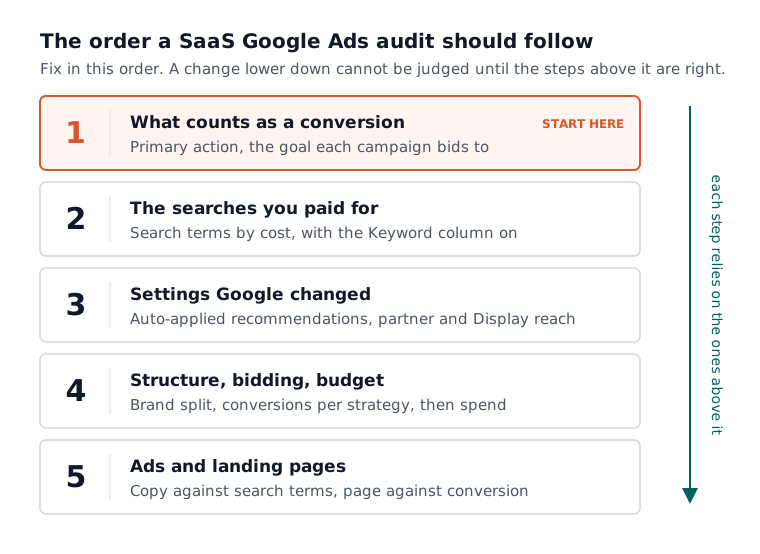
Step one: check what the account calls a conversion
Every SaaS Google Ads audit should open with conversion tracking, because every other number in the account is measured against it. If the primary conversion is a newsletter signup or any form fill, the bidding is trained to find those, and every keyword fix built on that number is ranked wrongly.
Google’s conversion goals help page (read 3 November 2026) says a conversion action only drives bidding when two things are true: the action is set as primary, and the campaign uses the goal that contains it. Secondary actions are still reported in the All conversions column but kept out of the Conversions column that bidding works from. That makes this the easiest place for an account to go quietly wrong.
So the first findings should answer three questions:
- Which conversion action is primary, and is it a trial, a demo request or a signup your sales team would recognise?
- Does each campaign bid towards the goal that contains that action, or towards a goal nobody chose?
- Does anything later in the funnel, a qualified demo or a paid account, come back into Google Ads at all?
Our free conversion tracking planner writes a plan with primary and secondary goals from four questions about your sales model, which gives the audit something to check against.

Step two: read the search terms behind the spend
Once the conversion is right, the audit should read the searches you paid for, sorted by cost. In the B2B SaaS accounts we see, this is where the waste lives: job seekers, students, people after a free tool, and a rival’s users looking for its login page.
Two cautions belong in the audit itself. Google’s search terms report page (read 3 November 2026) says the report lists the search terms used by a significant number of people, so a niche B2B product sees part of what it paid for rather than all of it. The same page says the Keyword column, which shows which of your keywords matched each search, does not show by default. Without it, nobody can say which keyword caused the problem.
How we run accounts shapes what we look for here. We default to phrase match and keep exact match for brand terms, so cutting an account back to exact only, as the poster above did, usually swaps waste for silence. The free search term analyser runs a first pass on an export of your own report, a fair check on whether an auditor found what is there.
Step three: find the settings Google changed for you
A SaaS audit should list every change in the account that no person asked for. Google’s auto-apply recommendations can make real changes without anyone logging in, and nobody remembers switching them on.
Google’s page on applying recommendations automatically (read 3 November 2026) lists what can be applied, including adding broad match keywords, expanding reach to Google search partners, using Display Expansion and adjusting CPA targets. It also says you can see which recommendations you are opted into from the Manage or History tab. An audit that never opens that tab can blame a keyword for spend that a setting created.
The same step should check the network settings on every Search campaign. Budget drifting onto partner sites and Display placements is a common reason we see a cleaned-up keyword list still producing junk leads: the clean-up only touched keywords.

Step four: structure, bidding and budget
Structure comes fourth because it only makes sense once you know what is being measured and bought. The audit should say whether brand and non-brand sit in separate campaigns, whether each campaign has enough real conversions for the bid strategy it uses, and whether the budget is spread so thinly that nothing gets enough data to learn from.
Bidding is where the order matters most. Google’s conversion goals page, linked above, says Smart Bidding strategies need a 7 to 14 day learning phase and that frequent changes to budgets, targets or conversion goals during it reset the window. So fix measurement first, then touch bidding once. An audit that recommends a new primary conversion and a new bid strategy in the same week has made both impossible to judge.
Budget comes last, on purpose. We never more than double an account inside a month, and an audit that opens with “spend more” before tracking is proven is selling, not diagnosing.
Step five: ads and landing pages
Ads and landing pages come last because they cannot be judged until the right people arrive and the right action is counted. Then the audit should check whether the ad copy matches the searches from step two, and whether the landing page asks for the same thing the primary conversion counts.
For a sales-led SaaS, does the page make booking a demo the obvious next step? For a product-led one, does the trial start without a sales form in the way? We covered that split in Google Ads for PLG vs sales-led SaaS.

What the audit document should contain
The document is what you are paying for, so agree its shape before anyone opens the account. A useful SaaS Google Ads audit hands over one ranked list, and every line carries four things:
- The finding, in one sentence, with the evidence from your own account.
- The fix, specific enough that someone else could make it.
- Why it sits where it does in the order, usually because something further down depends on it.
- Who makes the change, and how you will know it worked.
What it should not be is an optimisation score, a deck of screenshots, or forty findings of equal weight, which is a polite way of avoiding the question of which one matters. If the auditor cannot name the single change to make first, they have described your account rather than audited it.
What a SaaS Google Ads audit costs
An audit costs less than most founders expect and the fixes cost more, so work out who will make the fixes before you buy the list. There are three ways to get one.
- Do it yourself. Free apart from your time. Google’s own reports cover every step above, and our free tools do the first pass.
- Software. Audit and optimisation tools charge a monthly subscription and are quick at spotting rule breaks, but no tool knows whether a form fill became a customer unless you send that back to it. We compared what the main Google Ads tools cost, read off their own pricing pages.
- A specialist. A freelancer or agency audit is usually a fixed project, or free as part of a pitch. A free one is not worthless, but read it knowing it was written to win the retainer.
The real cost is afterwards. A ranked list is worth what someone does with it, and reading search terms, adding negatives and protecting tracking carry on every week. For who should do that work, see what a SaaS PPC agency costs and our comparison of a freelancer or an agency for SaaS Google Ads.
Where Atlas fits after the audit
Atlas is built for the part after the list. It connects to your own Google Ads account, builds campaigns in it (paused, for your review), then runs the weekly work on search terms, negatives, ads and budgets at the approval tier you choose: Manual, where you approve each change; Smart, where low-risk changes apply and the rest wait for you; or Full Auto, inside hard rails. Atlas stays read-only until you switch on the automations you want, and you can undo any change within 30 days.
Atlas is £149 a month, or £299 a month for Atlas + Human, where a professional ads manager from our team reviews every Atlas decision. The details are on our Google Ads for SaaS page. The free plan includes full conversion tracking setup, which is step one of this list, and is self-serve: Atlas does not run live ads on it.
Buy the order, not the score
If your account is cleaned up and still not working, the next thing to buy is not more clean-up. It is a ranked list that starts with what you count as a conversion and works outwards, with a reason for every position. Agree that shape first, give the auditor read-only access, and judge the result by whether its first line is something you could change this week.
Most of what an audit finds, you can check in an afternoon with Google’s own reports. The weekly work that follows is the decision worth spending money on.
To start with step one, set up conversion tracking on the free Atlas plan.
Questions people ask about this
- What access should I give someone auditing my Google Ads account?
- Read only is enough for an audit. Google's access levels page, read 3 November 2026, says read-only users can view campaigns, use planning tools and run campaign performance reports, but cannot edit campaigns or give anyone else access. Keep admin for people you have hired to make changes, and remove the auditor once the document is delivered.
- How often should a SaaS Google Ads account be audited?
- A full audit earns its cost when something changes: a new agency, a new pricing model, a new primary conversion, or results that fall with no visible cause. Between those, the weekly checks do the job. An account that seems to need a full audit every quarter usually needs a different person running it week to week.
- Does Atlas change my account as soon as I connect it?
- No. Our Google Ads for SaaS page says Atlas is read-only until you connect it and switch on the specific automations you want. Campaigns it builds arrive paused for your review, every decision is logged with its reason, and any change can be undone within 30 days.
- Does Atlas manage Meta ads the same way as Google Ads?
- No. On Google Ads, Atlas runs the account week to week at the approval tier you set. On Meta, the Atlas plan includes a toolkit for audiences, copy, creative and campaign building that you run yourself, so nothing is applied to a Meta account for you.
- Is there a minimum term on Atlas?
- No. Our terms say you can cancel at any time through the app, and cancellation takes effect at the end of your current billing period. Fees are non-refundable, and your account data is kept for three months afterwards in case you come back. No plan carries a guarantee of results.
