
Google Ads for Startups: First 90 Days

The first 90 days of Google Ads for a startup are not about growth. They are about buying clean evidence: which searches bring people who sign up, what each one costs, and whether the conversion you are counting is a real one. So the plan runs in four stages. Before launch, switch off the automation Google now turns on by default. In days 1 to 30, run a small phrase match Search campaign and read every search term. In days 31 to 60, cut what brought nobody and fix the landing page. In days 61 to 90, and only if the conversions are there, hand the bidding to Smart Bidding.
That order matters more than any single setting. A founder on r/googleads described the usual alternative: a brand-new B2B account on a brand-new domain, a month in, no conversions, losing more than half its impression share, and asking whether to fix Quality Score first. Quality Score was the least of it. Here is the whole plan on one page.
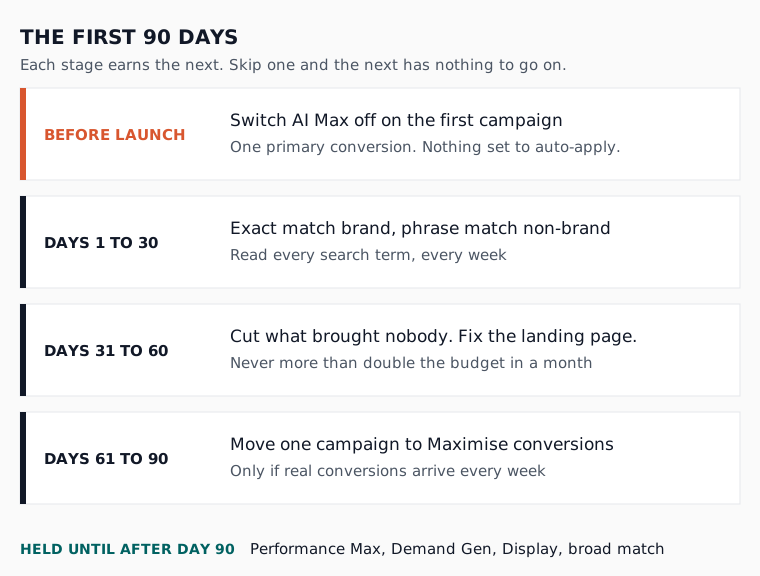
Before launch: switch off what Google switched on
A new Search campaign now arrives with Google’s automation on, so the first job comes before you spend a pound. Turn AI Max off on your first campaign, make sure nothing is set to auto-apply, and count exactly one conversion as the goal. Each takes five minutes.
Start with AI Max. Google’s Ads Editor 2.14 release notes, as reported by Search Engine Roundtable this month, say AI Max, text asset automation and Final URL expansion are now activated by default when you create a new Search campaign. Google’s own AI Max set-up page, read on the 17th of November 2026, says text customisation and Final URL expansion come on by default with it, and that these features need conversion-based Smart Bidding to work well. A new account has no conversions to feed that. Our post on what AI Max changes for a SaaS account goes deeper; on a first campaign, leave it off and test it later.
Then the conversion. Google’s Smart Bidding learning page, read the same day, advises optimising to a single, consistent conversion goal set as the primary account-default goal. For a SaaS that means choosing between a trial signup, an activated trial and a booked demo before launch, not after. Our piece on Google Ads for product-led and sales-led SaaS covers which, and the free conversion tracking planner turns the choice into goals you can create. Last, open the recommendation settings and untick anything set to apply on its own; our guide to running your own SaaS Google Ads lists the ones that bite.

Days 1 to 30: buy clean data, not volume
Month one is for a small, narrow Search campaign on the searches closest to a purchase, on bidding you control rather than a conversion strategy, and read every week. The aim is a list of real searches, what they cost, and which of them reached your signup page.
In how we run accounts, a first campaign looks like this:
- Brand terms on exact match, in their own campaign, so they never flatter the non-brand numbers
- Non-brand terms on phrase match: the problem you solve, your category plus “software”, and “alternative to” your best-known rival
- A starting list of negatives for jobs, courses, free and templates, before the first click
- One location setting, covering only where you can actually sell and support customers
Phrase match by default and exact for brand is our standing rule, because broad match with no conversion data to steer it is how a new account buys searches nobody would pay for. Keyword length matters too. In our keyword length study of 14 SaaS accounts, three-word keywords converted cheapest at £124 and one-word keywords at £135, so start with specific phrases rather than single words.
Then read the search terms every week, through the free search term analyser or with the ten-minute routine by hand. Zero conversions in month one is not a verdict on its own. A month of searches nobody would buy from is.
Why a new account loses impression share, and why Quality Score can wait
A new account that loses impression share usually has one of two problems: the budget runs out, or the ads lose the auction. Google reports them separately, so look first. Quality Score speaks to the second problem, not the first, and on a brand-new account it often has too little data to say much.
Google’s impression share page, read on the 17th of November 2026, defines Search lost IS (budget) as the share of time your ads did not show because the budget was too low, and Search lost IS (rank) as the share lost to poor Ad Rank. If budget is the cause, the fix is fewer keywords or more money, not better ads. If rank is the cause, the fix is relevance: ads that echo what was searched, and a landing page that answers it.
That is where Quality Score comes in. Google’s Quality Score page, read the same day, builds it from three parts (expected click-through rate, ad relevance and landing page experience), each rated against other advertisers whose ads showed for the exact same search over the last 90 days. It also says changing match types will not change it. So for the founder in that thread, the order is: confirm a real conversion is being counted, read the search terms, then see which of the three parts is below average. Chasing the score itself comes last.

Days 31 to 60: cut what brought nobody and fix the page
Month two is for acting on month one. Exclude the searches that brought nobody useful, pause the keywords that spent and never reached the signup page, and put your effort into the landing page, because that is the part of Quality Score you fully control. Leave the structure alone: rebuilding it now throws away the comparison you just paid for.
By now you will know which phrases bring searches you would happily pay for. Give those their own ad group with ads written to match, and add the best of them as exact match beside the phrase versions. How we run accounts is never more than double an account inside a month, because a bigger budget buys a wider set of auctions, not more of the same buyers.
The landing page is usually the cheapest win of the 90 days. Match the page’s headline to the search, put the price or the trial terms where a buyer can see them, and cut the form down to what sales actually uses.
Days 61 to 90: earn the right to automate
Smart Bidding is worth switching on once the account counts real conversions steadily, not on a date in the calendar. If by month three your one primary conversion fires every week and the leads behind it are real, move your strongest campaign to Maximise conversions. If it does not, stay put and fix the tracking first.
Expect a wobble when you switch. Google’s learning page says a new or reactivated bid strategy shows a Learning status that never lasts more than seven days, and that the campaign keeps serving as normal while it does. The same page warns that new strategies without history can see temporary swings, and that performance typically settles within one to two conversion cycles. With a long trial, judge the switch over weeks, not days.
Change one thing at a time in this stage. A new bid strategy, a new campaign and a new conversion goal in the same week leave you unable to tell which one moved the numbers. Write each change down with its date, so month four starts from a record rather than a memory.
What to hold back until after day 90
Some campaign types are worth holding back for the whole first 90 days, because each spends best with conversion data a new account has not built yet. None is wrong for SaaS for ever, only for an account that cannot yet say what a good lead looks like.
- Performance Max. It spreads budget across Google’s channels and steers by conversions, which a new account is short of. In how we run accounts it comes later, as an experiment against a Search baseline.
- Demand Gen and Display. These create interest rather than catch it. Useful later, but in month one they muddy the question of whether Search works.
- Broad match. Held back until Smart Bidding has a steady stream of conversions to steer it.
- Search partners and Display inside a Search campaign. If either is ticked in the network settings, untick it until you can judge Google Search on its own.
A practitioner on r/PPC starting a new SaaS account wanted Demand Gen beside Search and feared Performance Max would spend blind. We would hold both. If a launch needs demand created, LinkedIn creates the demand Google later converts, on a separate budget.

Where Atlas fits in the first 90 days
Atlas is an AI ads manager for B2B SaaS: an operator that builds and runs your Google Ads in your own account, inside limits you set. Not DIY, not an agency: the sensible middle ground.
On Google Ads, Atlas builds the account, conversion tracking, keywords, ads and a pre-launch negative list included, and creates every campaign paused, so nothing goes live until you have reviewed it. After launch it runs the weekly search term reviews and budget checks at the approval tier you choose, from full manual to full auto. Its safety rails never block a converting search term, and you can undo any change within 30 days. The Launch Google Ads for SaaS page shows what gets built. The prices are on our Google Ads for SaaS page: Atlas is £149 a month and applies weekly improvements with your approval. The free plan covers conversion tracking setup and limited use of the tools, and Atlas does not run live ads on it.
The Monday-morning version
If you launch this week, switch AI Max off on your first campaign, pick one primary conversion, and start with exact match brand and phrase match non-brand. Read the search terms every Friday for a month. Fix the page in month two. Move one campaign to Smart Bidding in month three, and only if the conversions are real and steady. Hold everything else until day 90.
If you would rather have the build done and the weekly reading handled inside limits you set, open a free Atlas account and start with your conversion tracking.
Questions people ask about this
- When can a new account add images to its Search ads?
- Not straight away. Google's image assets page, read on the 17th of November 2026, says the account must have been open for at least 60 days, have a good history of policy compliance, run active campaigns and text ads, and have spent more than zero on Search in the last 30 days. So images are a month-three job at the earliest.
- Do I still need to choose a language for a new Search campaign?
- No. Google's language targeting page, read on the 17th of November 2026, says that from September 2026 the campaign-level language setting is removed for Search campaigns and Search ads match on the language of your ads. Write your ads and landing pages in the language your buyers use, and let location targeting do the rest.
- Does raising my budget restart Smart Bidding learning?
- No. Google's Smart Bidding learning page, read on the 17th of November 2026, says changes to budgets, targets, creative or targeting settings never remove historical data or trigger a Learning status. What does trigger it is a new or reactivated strategy, adding or removing campaigns, ad groups or keywords, or a significant change to the conversion goal.
- Why does my Quality Score column show a dash?
- Google's Quality Score page, read on the 17th of November 2026, says a dash means there are not enough searches that exactly match your keyword to work out a score. On a new account that is common and not a fault. It fills in as the account collects impressions for that exact search.
- Do pinned headlines still work with AI Max switched on?
- Not always. Google's AI Max set-up page, read on the 17th of November 2026, says that when Final URL expansion is on, pinned responsive search ad assets are not used if Google picks a more relevant URL. To make sure pinned assets always serve, turn Final URL expansion off.
