
Brand vs Non-Brand Budget for SaaS

Your brand campaign does not get a percentage of the budget. It gets whatever it costs to show on nearly every search for your own name, and that is set by how many people search for you, not by you. Everything else goes to non-brand, which is where the real decision about a SaaS search budget lives. Keep the two in separate campaigns, judge them on separate numbers, and only pay for brand at all if one of three things is true about your account.
The argument usually starts elsewhere. In one r/googleads thread, an agency switched branded search off in a B2B SaaS account after the client’s SEO agency claimed paid was stealing organic leads, then stopped the test after two and a half weeks. Neither side had the number that settles it: total signups and demos from every source.
Brand spend is set by demand, not by a ratio
The right brand budget is the smallest daily budget at which the brand campaign never runs out, and nothing more. You cannot buy more searches for your name than people make, so money above that ceiling goes unspent and a budget below it hands clicks to whoever bids next. A fixed split is a guess wearing a number.
Check it with Search lost IS (budget), the share of auctions where your ads did not show because the budget ran out. Google’s impression share page (read 10 November 2026) says that column is available at campaign level only, which is one more reason brand needs a campaign of its own. On brand it should sit at or near nothing. If it does not, raise the brand budget before you touch non-brand.
Brand clicks also tend to be cheap, and Google explains why. Its page on ad group prioritisation (read 10 November 2026) says your cost per click is the minimum needed to clear the Ad Rank thresholds and beat the advertiser immediately below you, if there is one. On your own name there is often nobody close behind. That is also why brand flatters any CPA it is blended into, as we covered in why your non-brand CPA keeps climbing.
What is left belongs to non-brand. When money moves from brand into non-brand, we never more than double an account inside a month, because the bidding needs time to settle.

When a brand campaign earns its keep
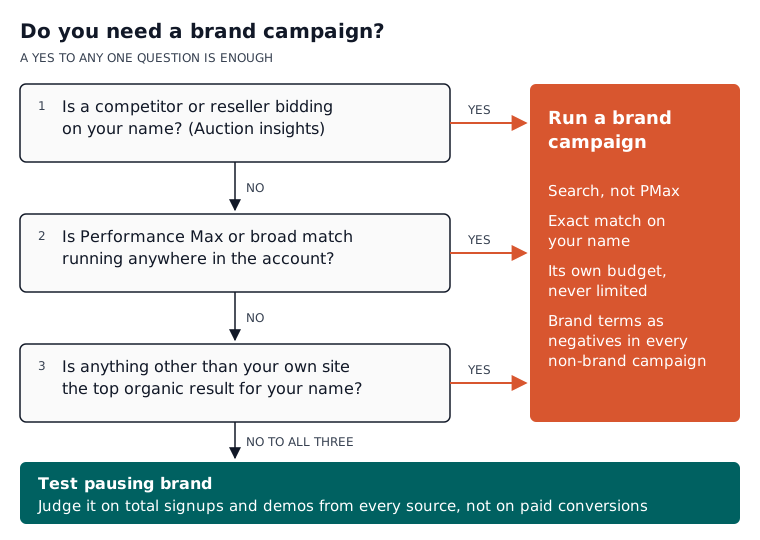
A brand campaign pays for itself when something else would take the click on your name if you were not there. In a B2B SaaS account that comes down to three checks, and a yes to any one of them is enough to keep brand running with its own budget.
- Someone else bids on your name. Auction insights on a brand keyword shows who else appears. Google’s trademarks policy (read 10 November 2026) says it will not restrict trademarks used as keywords, so a rival or a review site can bid on your product name.
- Performance Max or broad match runs in the account. Both can match searches for your name. Without an exact-match brand keyword, your cheapest conversions end up inside a campaign you judge on something else, and its numbers look better than they are.
- Your own site is not the top organic result. A comparison site, a marketplace listing or a namesake company sitting above you means the free click is not as free as the SEO agency thinks.
If all three are no, brand is buying clicks you would mostly get anyway, and the honest move is to test pausing it rather than argue. The method is further down this page.
What Performance Max does with your brand searches now
A Search campaign with an exact-match keyword for your name takes priority over Performance Max on that search. Google’s page on how Performance Max interacts with other campaigns (read 10 November 2026) says a keyword that exactly matches or is spell-corrected to the query is preferred over PMax, so a brand Search campaign is how you keep that traffic where you can see it.
The same page gained a line in early November 2026: PMax may filter out navigational or brand-specific searches so that dedicated Search campaigns serve them, and Google asks advertisers to give those brand campaigns enough budget and eligible ads. A cached copy of the page dated 8 November carries that paragraph, but the live page we loaded on 10 November did not show it. Either way the word is “may”, and the action is the same: stop relying on PMax to cover your own name.
If you go further and exclude your brand from PMax, Google’s brand settings page (read 10 November 2026) says PMax brand exclusions apply to Search and Shopping inventory, and that brand inclusions are only for Search campaigns. Put the brand Search campaign live before the exclusion, or a competitor gets a gap on your name. For the wider broad match changes, see what AI Max changes for a SaaS account.

How we set up a brand campaign
Brand goes in its own Search campaign, on exact match, with its own budget and its own reporting line. Everything outside it runs on phrase match by default, with your brand terms added as negatives, so non-brand numbers stay clean. That is how we run accounts, and it is the same split our Google Ads for SaaS page describes.
Two SaaS details catch most accounts. First, many brand searches come from people who already pay you: “yourproduct login”, “yourproduct status”, “yourproduct API docs”. Those are customers on their way to work, not buyers, so add them as negatives on the brand campaign and let organic carry them. The free search term analyser pulls these out of an export quickly. Second, “yourproduct pricing” and “yourproduct vs rival” are brand searches with buying intent, and they deserve their own ad group with ads that answer the question.
For bidding, Target impression share was built for this job. Google’s page on it (read 10 November 2026) says it can be useful for campaigns with brand terms, offers three placements (top, absolute top and anywhere), and warns that a Max CPC bid limit set too low will stop it reaching its goal. Set the limit anyway, at a price you would pay for a brand click on a bad day, and look at it in the weekly lever checks alongside budget and search terms.
Why non-brand gets less credit than it earns
Non-brand looks worse than it is because the buyer often comes back on your name. Someone clicks a non-brand ad, leaves, and returns days later by typing your name, and whatever counts the last touch credits brand or organic with the demo. A B2B SaaS team on r/PPC asked this month whether that was a landing page problem. It is normal behaviour.
You can see the pattern in your own account. Google’s attribution reports page (read 10 November 2026) says the reports show whether some keywords assisted conversions that eventually happened through other keywords. Open Attribution in the Goals menu, choose Conversion paths, and switch the view to Transition paths to see buyers moving from a non-brand campaign to a brand one before they convert. Google Ads only sees ad interactions, so a return through organic search shows up in your analytics or CRM instead.
So never cut non-brand on last-click numbers alone. Compare what Google Ads counts for non-brand with what your CRM credits it, and watch brand searches in Search Console after a non-brand change. If brand searches fall when non-brand spend falls, non-brand was doing more than its column said. Our piece on Google Ads for PLG versus sales-led SaaS covers which conversion to count in the first place.

How to test switching brand off without guessing
Run a time-boxed pause and judge it on total signups and demos from every source, not on paid conversions, which fall by definition when you pause a campaign. The question is whether total pipeline fell with them, or whether organic picked up the same people for free.
Before you pause, write down four things for the previous period: total signups and demos from your CRM, brand clicks to your site in Search Console, who else appears in auction insights on your brand keyword, and brand campaign spend. Then pause the brand campaign and nothing else, or you will not know which change did what.
Run it for at least as long as your buyers take to convert. The Path metrics report on that attribution page shows how long conversions take from the first or last ad interaction. In a sales-led account with a long cycle, a pause as short as the one in that thread is probably too short to read. When it ends, read it honestly:
- Total held and organic brand clicks rose. Brand was buying clicks you already had. Keep it off, or bring it back on a low Target impression share.
- Total fell, or a competitor appeared on your name. Turn it back on at the old budget.
- Too few conversions to tell either way. That is an answer about the test, not about brand. Keep brand on and try again when volume grows.
What to do with your brand budget this week
Split brand into its own exact-match Search campaign if it is not already, fund it until Search lost IS (budget) reads near nothing, add brand terms as negatives everywhere else, and negate the login and support searches. Then run the three checks. Any yes means brand stays on. Three noes means run the pause and let total pipeline decide, not the agency with the louder report.
If you would rather not do the weekly part by hand, Atlas builds and runs SaaS Google Ads accounts. It reads the search terms every week, adds negatives inside hard rails (at most 30 a day, and never a converting search term) and applies changes at the approval tier you set. Campaigns are always created paused, and anything Atlas does can be undone within 30 days. The Atlas plan is £149 a month, with the detail on the Atlas page; the free tier sets up conversion tracking, but Atlas does not run live ads on it.
Start free at app.saasadsstudio.com and get conversion tracking right before you decide anything about brand.
Questions people ask about this
- Can a competitor put my product name in their ad text?
- Not freely. Google's trademarks policy, read 10 November 2026, says it will not restrict trademarks used as keywords, but when a trademark owner complains it will restrict a trademark used in an ad from a direct competitor. Complaints are accepted against specific advertisers identified by their URLs, in the countries where you have shown trademark rights.
- Do brand lists cost extra in Google Ads?
- No. Google's brand settings page, read 10 November 2026, says there is no additional cost to apply brand lists to campaigns. It also warns that brand settings limit a campaign's reach and performance may decrease, and recommends using them only on campaigns that really need them.
- Will a brand list catch misspellings of my product name?
- Usually. The same brand settings page says one benefit of brand lists over keywords is not having to enter misspellings, variants or versions in other languages. To be in Google's brand library a brand needs at least one of a logo, a trademark, a domain name or a product or business name, and you can request that a missing brand is added.
- Does impression share include Search Partners?
- No. Google's Target impression share page, read 10 November 2026, says impression share only includes the Google Search Network and excludes Search Partners. So a brand campaign showing near-full impression share tells you about Google search results, not about every site your ads can appear on.
- How far back can I look at conversion paths in Google Ads?
- Up to two years. Google's attribution reports page, read 10 November 2026, says date ranges can start as far back as two years ago and older path data is deleted. Separately, the lookback window can be set to 30, 60 or 90 days, and most reports open at 30.
